How to Set Up a Repair Ticket System for Your Jewelry Shop
Example with sample data
Repair management: a repair status handoff
For a shop choosing jewelry repair tracking software, the useful question is whether the next person can see what is waiting and what to do next.
- At intake, keep Clara Bennett’s item description and condition photographs with HL-0014. A quote is an offer, not an approved job.
- Record the US$60 quote and the pending decision. If the scope changes, retain the revised quote and seek approval before work begins.
- After the repair and a collection check, update the ticket. Use the reference issued by your shop when checking progress; this article cannot look up a repair held by another retailer.
- Ticket
- HL-0014 · clasp replacement
- Intake
- 17 October · worn clasp photographed
- Quote
- US$45 labour + US$15 clasp = US$60
- Repair status
- Awaiting quote approval; work has not started
- Next action
- Workshop lead checks approval before ordering the clasp
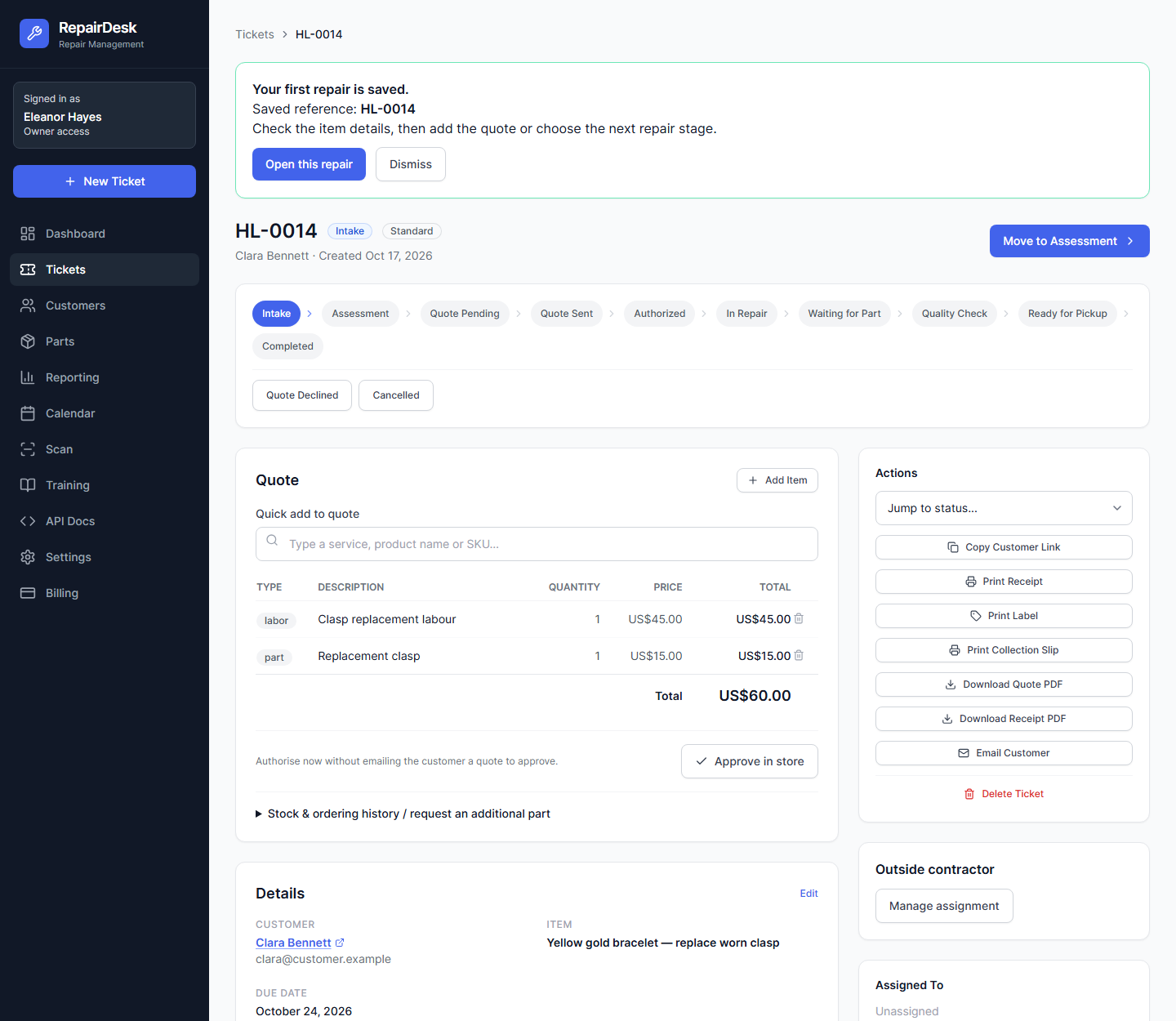
RepairDesk offers intake photos, quotes, repair tracking and Shopify POS. Check the approval and collection steps during your trial. SMS needs setup and any required carrier approval; use email or customer tracking while that is pending.
Plans and a useful first check
RepairDesk has a 14-day trial and no permanent free plan. Monthly USD plans are Starter $9.99, Professional $19.99 and Business $29.99. Check which features are included in your chosen plan.
Start the RepairDesk 14-day trial on Shopify. Check the workflow and current plan during your trial.
Repair management questions
Can repair management software track a repair status?
RepairDesk advertises repair tracking from intake to collection. Record the current stage and next action against the ticket. Customers need the reference or tracking route issued by their own repair shop; this article cannot retrieve another retailer’s repair.
What does RepairDesk cost?
RepairDesk has a 14-day trial, then Starter US$9.99/month, Professional US$19.99/month or Business US$29.99/month. There is no permanent free plan. SMS requires configuration and any applicable carrier approval.
What to record at intake
A repair ticket should identify the item, the reported problem and its condition when received. Keep photographs and the ticket reference together. Note any work still awaiting inspection rather than presenting an estimate as a final price.
Keep the next decision visible
A useful repair management process distinguishes a quote awaiting approval from approved work, work in progress and an item ready for collection. Agree stage names with the team and check that each ticket has a next action. A photograph supports the condition record; it does not settle every possible dispute.
Customer updates and repair status
RepairDesk advertises customer tracking and email/SMS updates. Test the tracking route with a development record and confirm what the customer can see. SMS needs configuration and applicable carrier approval. No measured reduction in inbound calls is established here.
Try one repair before moving your records
Check an intake record, quote decision and collection handoff during the trial. Confirm the current tier and any messaging prerequisites on the listing. For the wider workflow, see our watch and jewellery repair software guide or browse the separate jewellery apps.
Have an awkward problem like this one?
Send us one workflow. JMS Dev Lab will recommend the most sensible next step: build, buy, automate or wait.
— or leave your email for one practical reply, with no newsletter —