Jewelry Valuation Software: What to Look For
Example with sample data
Jewellery valuation certificate software: record to reviewed PDF
When comparing appraisal certificate software, check the saved evidence and the document you can retrieve after approval, as well as the layout.
- Record the item description, purpose and evidence before assigning a value. The example uses a manually entered EUR62 stated-purity metal rate; it is not a current market price.
- The 4.2 × 62 calculation gives EUR260.40. It does not establish a complete ring value: stones, condition, workmanship and the chosen basis still need professional assessment. Do not apply purity a second time to a stated-purity rate.
- Save the draft, send it for review and check the approved PDF before issuing it. Confirm that you can reopen the saved document when you need it.
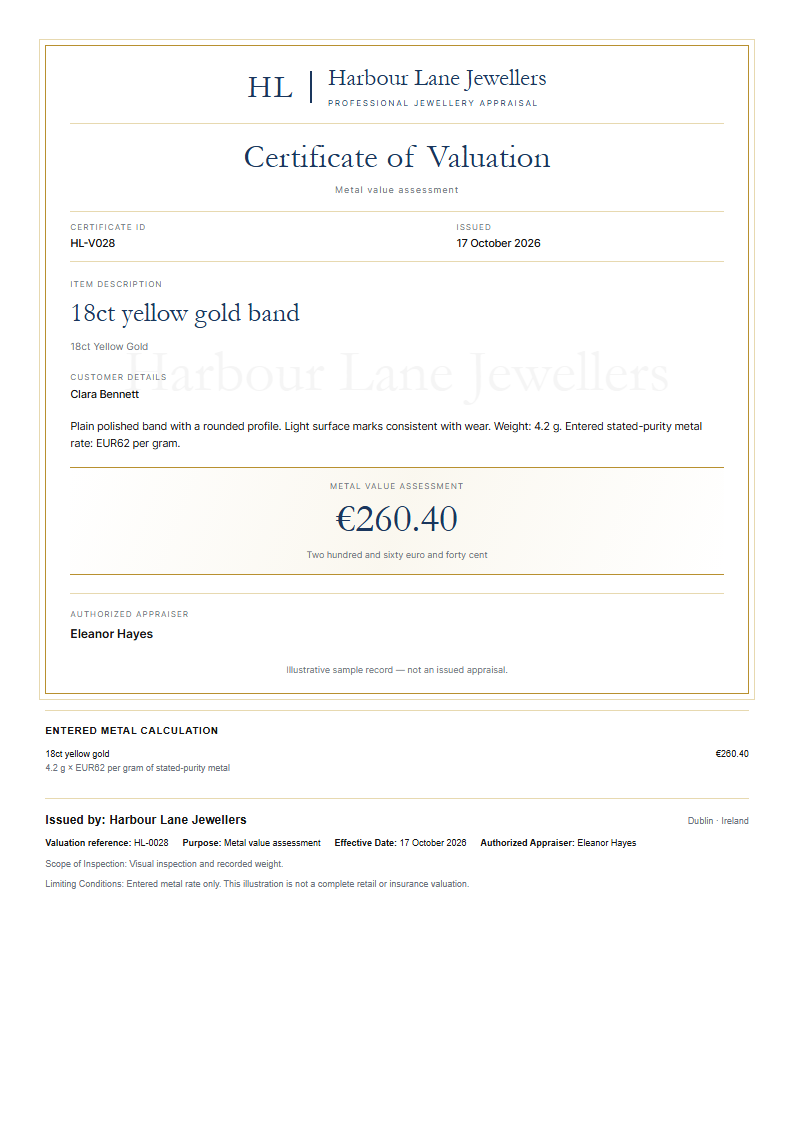
Open the full-size certificate
The valuer remains responsible for the evidence and assessment. This example uses an entered metal rate, not a live price. Check the recipient’s requirements: a certificate does not guarantee insurer acceptance or establish accreditation.
Plans and a useful first check
Jewel Value offers a 14-day trial with no permanent free plan. Monthly USD plans: Basic $9.99 (up to 50 valuations and PDF generation advertised); Professional $29.99 (up to 500, custom branding and up to 10 users advertised); Enterprise $59.99 (advanced reports, unlimited team members and priority support advertised). Check the limits and features of your chosen plan during the trial.
Start the Jewel Value 14-day trial on Shopify. Check the workflow and current plan during your trial.
Valuation software helps you keep an item's description, evidence, assessment and report together. Choose it by the work you need to document: insurance replacement, an estate matter and a possible resale are different purposes. The valuer decides the appropriate basis and method; software does not supply those qualifications or guarantee acceptance.
Start with the purpose and recipient
Ask who will use the report and for what decision. Confirm their requirements for the valuer, evidence, value basis, currency and report date. Do this before choosing a template. A polished PDF cannot make an unsuitable assessment appropriate for another purpose.
What to check in a valuation tool
- Identifiable item: description, materials, markings, measurements, condition and photographs where relevant.
- Evidence with provenance: distinguish what you examined, what a laboratory report says and what the customer supplied. Record limitations rather than guessing missing grades.
- Transparent working: value basis, currency, date, rate source and professional adjustments should be understandable.
- Review and retrieval: save a draft, review the assessment and retrieve the exact issued document later.
- Readable output: open the downloaded PDF and inspect descriptions, images, page breaks, value and valuer details.
Jewel Value: the record-to-PDF workflow
Save the item record as a draft, submit it for review, then approve the assessment before downloading the generated PDF. Reopen the saved record and read the downloaded document before issuing it. A generated certificate is a document, not professional accreditation or an insurer's acceptance.
The local workflow uses rates entered by the valuer. A rate is an input to the calculation, not an independently verified market valuation. Confirm the source, currency, purity basis and date of any rate you use; an automatic live feed was not verified in this check.
The workflow was checked with synthetic records in an isolated development environment on 16 October 2026. This checks that development path; it does not certify every live installation, plan entitlement or professional use. Shopify installation, customer delivery and insurer acceptance are separate checks.
A calculation is not a complete valuation
In the development example, 4.2 grams multiplied by an entered rate of 62 gives 260.40 in the selected currency. That demonstrates arithmetic using a stated-purity rate. It is not a market quote, a value for an actual ring, or a reason to omit stones, workmanship, condition, tax treatment or the chosen valuation basis. If your rate is for pure metal instead, apply the appropriate purity basis; do not apply purity twice.
Compare your own work, without a promised time saving
Use one representative item and compare the entire process with your current method: examination, evidence entry, review, corrections, PDF retrieval and filing. Measure your own time. A scripted development run does not establish how long professional appraisal work takes or how much your business will save.
Keep integration claims specific
Jewel Value is available through Shopify and as a web app. Test the exact customer and document handoff you need. Do not assume bidirectional synchronisation with your POS, insurer, accounting software or another JMS app.
Plans and a practical trial check
Basic is US$9.99/month after a 14-day trial, with up to 50 valuations per month and PDF generation advertised. Professional is US$29.99/month with up to 500 valuations, custom branding and up to 10 team members advertised. Enterprise is US$59.99/month; check the listing for its current limits. There is no permanent free plan.
Install Jewel Value on Shopify. During the trial, save and reopen an item, approve it, retrieve the PDF and compare the output with your recipient's requirements. Check branding and access on the plan you intend to buy. For the document checklist, see our appraisal software guide.
Valuation software questions
What features should jewelry valuation software have?
Look for item records, traceable evidence, explicit value basis and currency, review, readable PDF output and retrieval. Check plan entitlements and the recipient’s requirements.
Does software guarantee insurer acceptance?
No. The valuer remains responsible for the assessment, professional standards and the recipient’s requirements. A PDF or required-field check does not guarantee acceptance.
How much time does valuation software save?
No general time saving is established here. Compare a representative complete assessment with your current method, including review, corrections and document retrieval.
How much does Jewel Value cost?
Basic is US$9.99/month after a 14-day trial, with up to 50 valuations per month and PDF generation advertised. Professional is US$29.99/month with up to 500 valuations, custom branding and up to 10 team members advertised. Enterprise is US$59.99/month; check the listing for its current limits. There is no permanent free plan.
Related reading: Best Jewelry CRM Software in 2026 · Best Jewelry CRM Alternatives for Independent Designers in 2026 · Best Shopify Apps for Jewelry Stores in 2026 · How to Set Up a Repair Ticket System for Your Jewelry Shop · BriteCo Alternatives for Jewellers · Jewel Value: Professional Jewelry Valuations · JMS Dev Lab — jewellery software.
Part of our jewellery software series — explore the full jewelry store software suite for Shopify.
US jeweler? See the American-English companion guide: Jewelry Appraisal Software: What US Jewelers Should Look For.
Have an awkward problem like this one?
Send us one workflow. JMS Dev Lab will recommend the most sensible next step: build, buy, automate or wait.
— or leave your email for one practical reply, with no newsletter —