How to Track Custom Jewelry Commissions Without Spreadsheets
Example with sample data
Commission management for a custom jewelry order
Custom jewelry order management needs a clear record of the design being discussed and the decision still needed before the bench handoff.
- Record HL-0028 for Clara Bennett’s oval sapphire pendant, including the stone and setting details. Keep the target date separate from a promised delivery date.
- Label the lower-setting drawing R2 and retain the R1 context. Approval of R1 cannot be treated as approval of R2. A changed stone or setting needs a fresh decision.
- The bench handoff should identify the agreed version and next action. Check any deposit in the actual payment/order system. A note saying “deposit due” is not a receipt.
- Commission
- HL-0028 · oval sapphire pendant
- Brief
- 18ct yellow gold · low-set oval sapphire · target 30 November
- Revision
- R2: lower setting; R1 retained as earlier proposal
- Decision
- R2 awaiting client approval
- Next action
- Eleanor confirms R2 before bench handoff
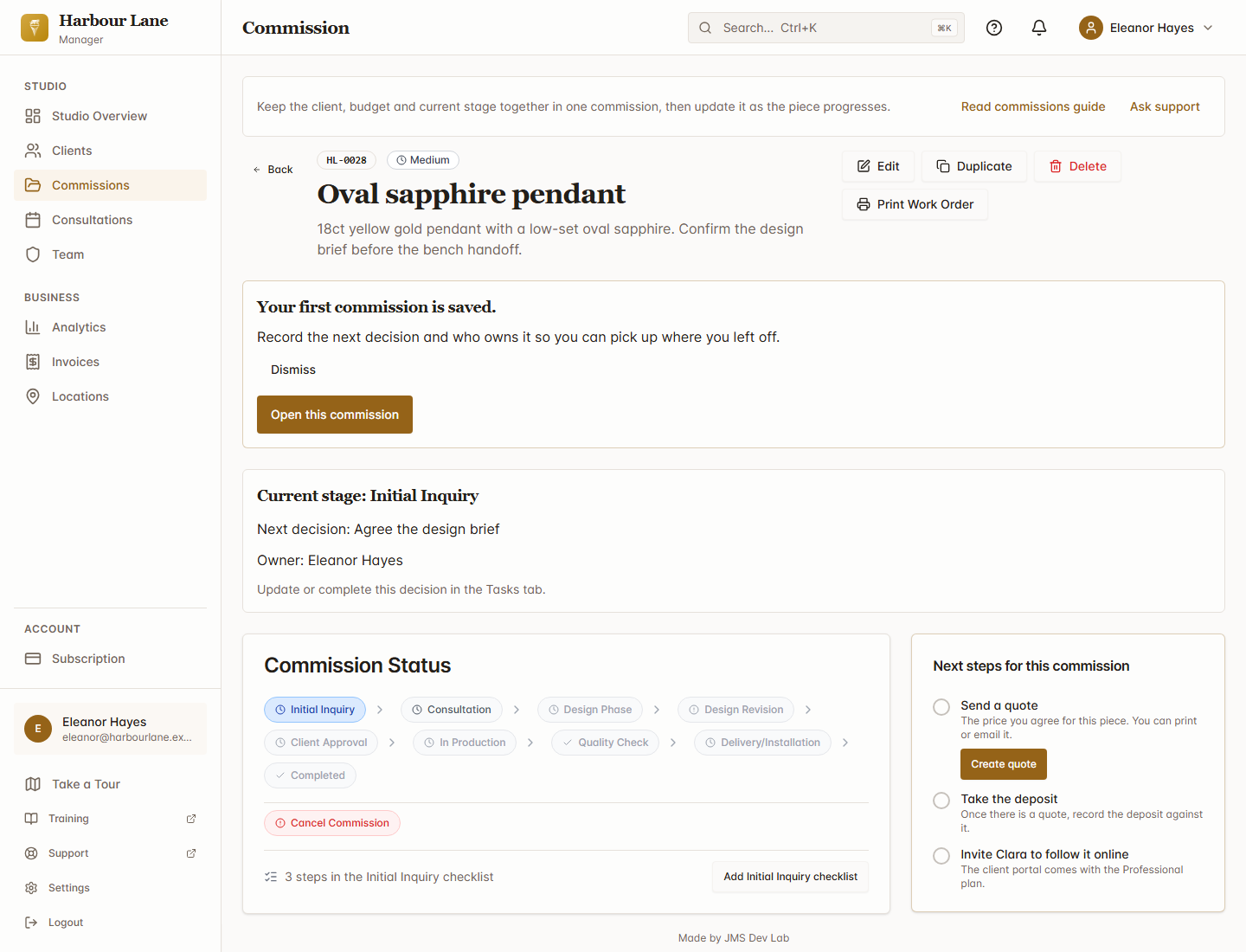
The screenshot shows the initial inquiry, before design approval. Use the steps above as a checklist as the order progresses. Jewelry Studio Manager keeps custom commissions and client records; check how you will record design revisions and deposits during the trial. It does not provide CAD, staff sales-commission accounting or an accounting software integration.
Plans and a useful first check
Jewelry Studio Manager has a 14-day trial and no permanent free plan. Monthly USD plans: Starter $9.99 (up to 50 clients and active commissions); Professional $19.99 (unlimited clients/commissions, client portal and design approvals advertised); Enterprise $29.99 (custom workflows/API and multi-location features advertised). Check plan limits and the approval steps during your trial.
Start the Jewelry Studio Manager 14-day trial on Shopify. Check the workflow and current plan during your trial.
If you run a custom jewelry studio, you know the chaos. A client enquiry comes in by email. You scribble down their ring size and metal preference on a Post-it. The design approval lives in a WhatsApp thread. The deposit payment is in your Shopify orders but the commission details are in a spreadsheet. And somewhere in the middle, you're trying to remember which stage each piece is at.
It works when you have three commissions on the go. It falls apart at ten.
Why Spreadsheets Break for Custom Jewelry
Custom jewelry commissions aren't like standard retail orders. Each one is a multi-week (sometimes multi-month) process with distinct stages: enquiry, consultation, design, approval, production, quality check, and delivery. A spreadsheet can list these stages, but it can't enforce them, automate transitions, or give your client visibility into where their piece is.
The real problems start when you try to track the details that matter:
- Client preferences — Ring sizes, metal preferences, stone choices, allergies, budget ranges. These live in emails, notes apps, and your memory. A spreadsheet row can't hold a rich client profile.
- Design iterations — Clients change their minds. The original brief evolves through three consultations. Tracking revision history in a spreadsheet means adding columns until the sheet is unreadable.
- Materials and costing — Gold prices change. You need to track what was quoted, what was ordered, and what was actually used. Spreadsheet formulas can do this, but they break the moment someone inserts a row in the wrong place.
- Communication history — When did you last update the client? What did you tell them? If your communication is scattered across email, phone, and messaging apps, the answer is always "I think it was last week."
What a Purpose-Built System Looks Like
Compare the record you need with the workflow each tool offers. A commission tracker should make the current brief and next decision easy to find.
A purpose-built commission tracker gives you:
- A visual pipeline — See every active commission at a glance, grouped by stage. Know instantly which pieces are waiting for client approval, which are in production, and which are ready for collection.
- Rich client profiles — Store preferences, measurements, past orders, and notes in one place. When a returning client calls, you know their history before they finish their sentence.
- Consultation scheduling — Book design consultations, send reminders, and log what was discussed — all linked to the commission record.
- A client portal — Give your clients a branded space where they can see their commission progress, approve designs, and access documents. It's a better experience for them and fewer "any updates?" messages for you.
Making the Switch
If you're a Shopify jeweler, the switch is simpler than you think. JewelryStudioManager was built specifically for this — it lives inside your Shopify admin, syncs with your store data, and replaces the spreadsheet with a proper commission management system.
You don't need to migrate years of data on day one. Start with your active commissions, get comfortable with the workflow, and expand from there.
Ready to ditch the spreadsheet?
Try JewelryStudioManager or see all our tools.
Related reading: Best Jewelry CRM Software in 2026 · Best Jewelry CRM Alternatives for Independent Designers in 2026 · Best Shopify Apps for Jewelry Stores in 2026 · Jewelry Valuation Software: What to Look For · JMS Dev Lab — jewellery software.
Part of our jewellery software series — explore the full jewelry store software suite for Shopify.
Product questions
What does Jewelry Studio Manager track?
Jewelry Studio Manager keeps bespoke jewellery commissions, client preferences, consultations and progress together. A commission here means a customer’s custom piece, rather than staff sales commission payments. It is not CAD design software.
How much does Jewelry Studio Manager cost, and is there a trial?
There is a 14-day free trial, followed by Starter US$9.99/month, Professional US$19.99/month or Enterprise US$29.99/month. Starter covers up to 50 clients and active commissions. There is no permanent free plan.
Which plan includes the client portal and design approvals?
The live Shopify listing advertises the client portal and design approvals on Professional at US$19.99/month. Check current plan entitlements before choosing a plan.
Can I start with current commissions rather than all my old spreadsheets?
Start by recording current commissions and the next decision for each piece. Keep historical records available while you evaluate the new workflow. Shopify and standalone entry routes are available.
Who we are
JMS Dev Lab builds practical apps and custom software for growing businesses. The jewellery apps on this page are our products; we disclose that relationship so you can assess our recommendations.
Product facts checked . Prices are USD per month; check the linked Shopify listing before installing.
Have an awkward problem like this one?
Send us one workflow. JMS Dev Lab will recommend the most sensible next step: build, buy, automate or wait.
— or leave your email for one practical reply, with no newsletter —