Turn a book into an audiobook, free, on your own computer
Text2Audio is a free desktop app that reads a manuscript aloud and saves it as a proper chaptered .m4b audiobook — the kind that plays in Apple Books, Smart AudioBook Player and BookPlayer with full chapter navigation. Everything runs locally with open speech models: no cloud, no accounts, no per-use cost, and nothing leaves your machine. It can even clone a voice from a short sample.
Free & open source (MIT) • Windows, macOS & Linux • No account needed
🔊 Hear a sample — narrated entirely by Text2Audio:
A complete audiobook studio that runs on your own machine
Drop in your manuscript (.txt or Markdown), pick a narrator, and get a mastered .m4b with chapter markers. It is open source, so you can read exactly what it does, and it runs entirely offline — your words and the finished audio never touch the internet.
Book → audiobook
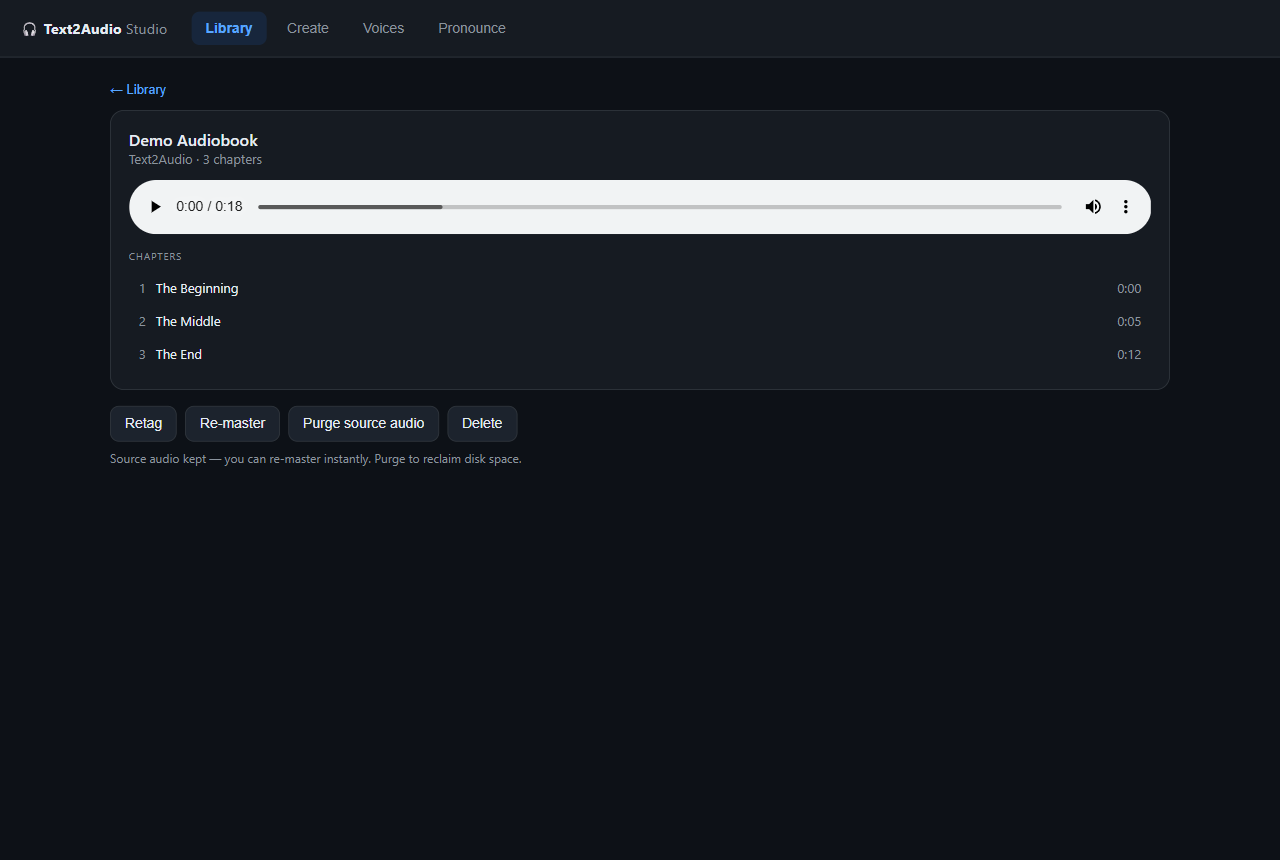
Text or Markdown in, chaptered .m4b out. Each chapter file's first heading becomes its chapter title, so listeners can skip and resume just like a commercial audiobook.
Mastered audio
128 kbps AAC, loudness-normalised to around −19 LUFS, high-pass filtered, with natural sentence and paragraph pacing. Re-master any book instantly without re-synthesising.
Reads text correctly
Expands numbers and abbreviations, and an editable pronunciation dictionary fixes tricky names and places so the narration doesn't stumble.
Voice cloning (optional)
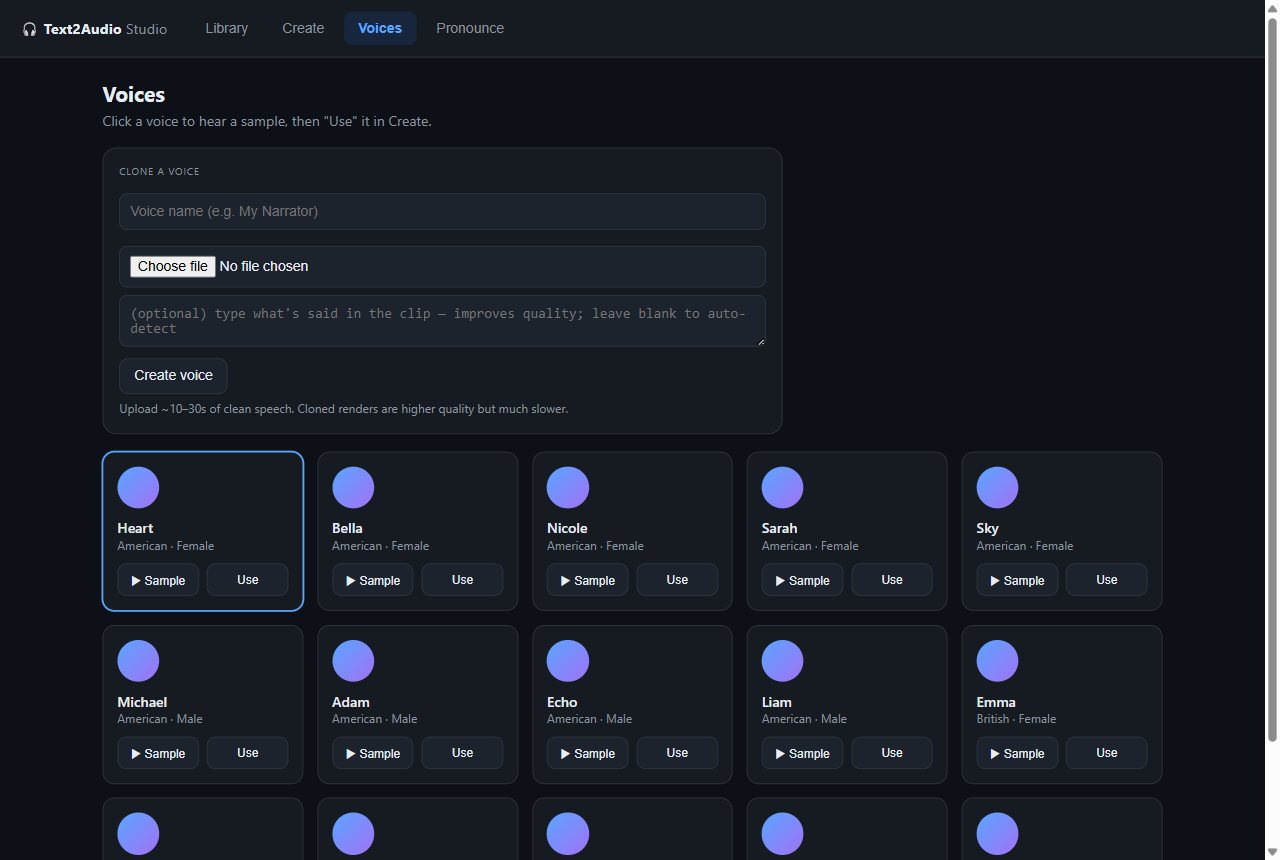
Give it 10–30 seconds of clean speech and narrate in that voice, powered by F5-TTS. The fast default voice stays available; cloning runs isolated so it never slows the rest down.
Studio web UI
Drag-and-drop multi-file import, a voice gallery, live per-chapter progress, a built-in chapter player, and a library of everything you've made — all in your browser.
100% local & private
Everything runs offline on your own hardware using open models. Your manuscript and audio never leave your computer; nothing is uploaded to JMS Dev Lab or anywhere else.
One clean studio, a few simple steps
Choose or clone a voice, generate with live progress, then listen and manage your library — all in the browser.
Three steps, no command line
On Windows you can be up and running in three steps. There is nothing to configure — no API keys, no terminal, no account.
Download and unzip
Grab the project as a ZIP from the latest release and unzip it anywhere — your Desktop is fine.
Double-click Install
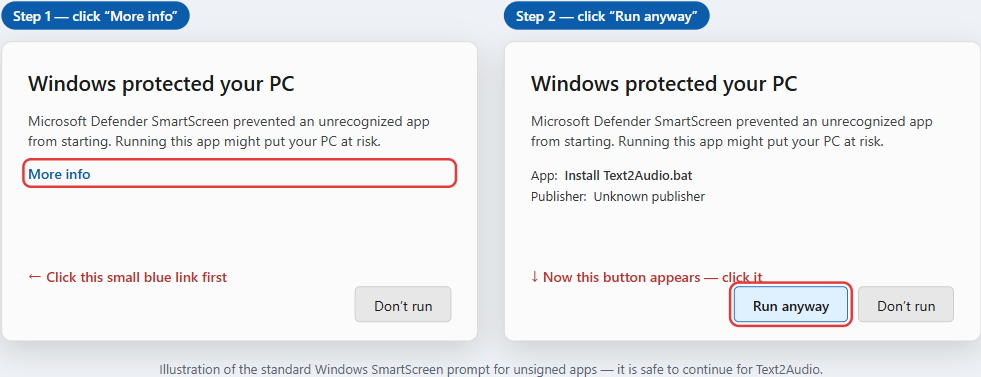
Run Install Text2Audio.bat. It sets everything up for you — Python, the app, ffmpeg and the speech tools — and adds a Desktop shortcut. The app is not code-signed yet, so Windows may show a SmartScreen prompt — choose More info → Run anyway.
Double-click Start
Run Start Text2Audio. Your browser opens the Studio and you're making audiobooks. The voice model downloads once, then it's fully offline.
pip install git+https://github.com/mooja77/Text2Audio and run text2audio. Full instructions are in the project's INSTALL guide.
Audiobooks shouldn't cost a subscription or your privacy
Commercial AI narration tools charge per word, lock your audio behind an account, and send your manuscript to someone else's servers. Text2Audio is our answer: a proper audiobook studio that's free, private, and yours to keep.
Free forever
MIT-licensed and open source. No subscription, no per-word billing, no upsell. Use it for as many books as you like.
Private by design
It runs on your own hardware. Your words and the finished audio never touch the internet.
Yours to inspect
The full source is on GitHub, MIT licensed. Read it, fork it, improve it — contributions are welcome.
Real audiobook files
Proper .m4b output with chapter markers, not just a wall of MP3 — it behaves like a book in any audiobook player.
Inspect it, fork it, improve it
The full code is public and MIT licensed — the text pipeline, the speech engine, the mastering, the Studio UI. Nothing is hidden, and nothing phones home to JMS Dev Lab.
Want a tool like this for your own business?
We build practical, private software for real-world workflows — including custom audiobook and media tooling.
Email JMS Dev Lab